

The application is completed through the official e-Konsulat system. After filling it in, the applicant prints the form and submits it together with the visa documents.
⚠️ Important Rules Before Filling Out the Form
Before starting, remember:
- the form is free
- it must be filled out personally by the applicant
- names and surnames must match the passport exactly
- Polish addresses and names should be written in Latin letters
- dates must be written in the format YYYY-MM-DD
- passport-based data should be copied exactly
1️⃣ Step 1: Registration in e-Konsulat
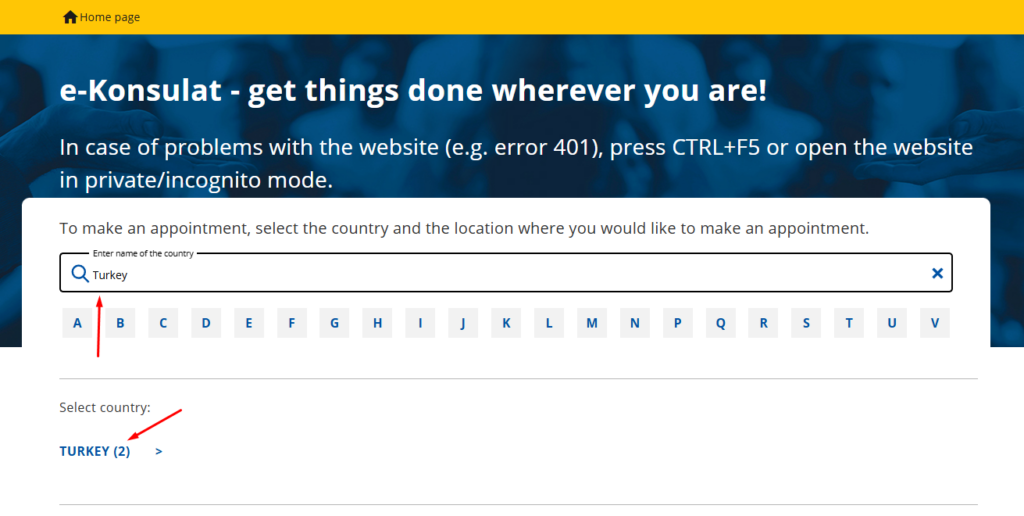
1) Enter the e-Konsulat website and chooses the country and consular office.
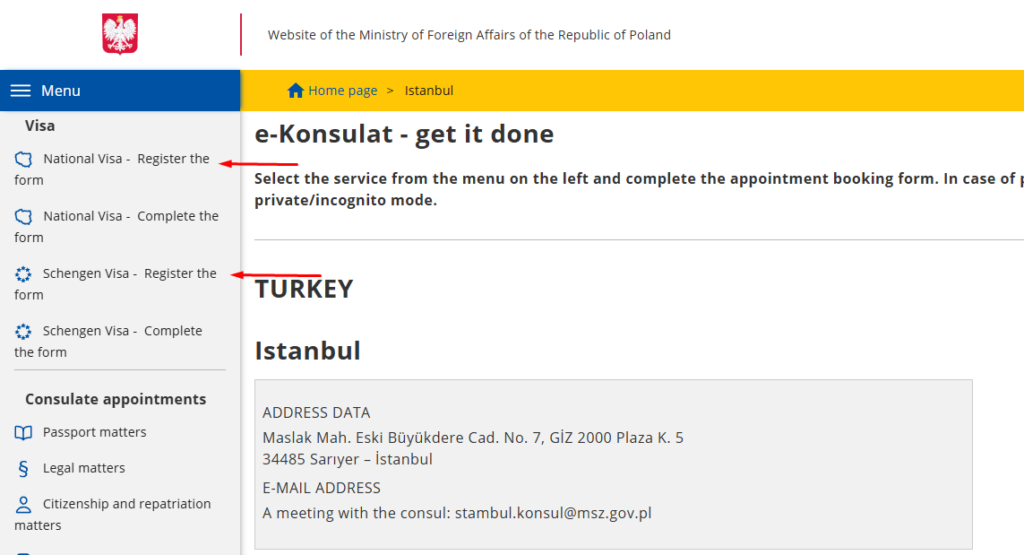
2) Select the visa type:
- National visa,
- Schengen visa
Click “Register the form” — complete the form AND schedule an appointment — or click “Complete the form” and print the form without scheduling an appointment.
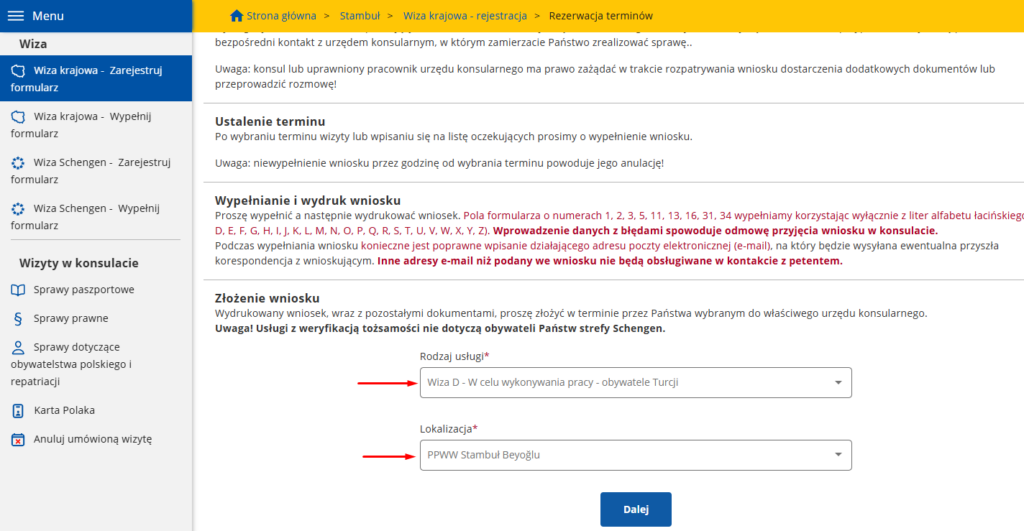
3) Select the purpose of the visa and choose the consular office
4) Complete the form and submit the request
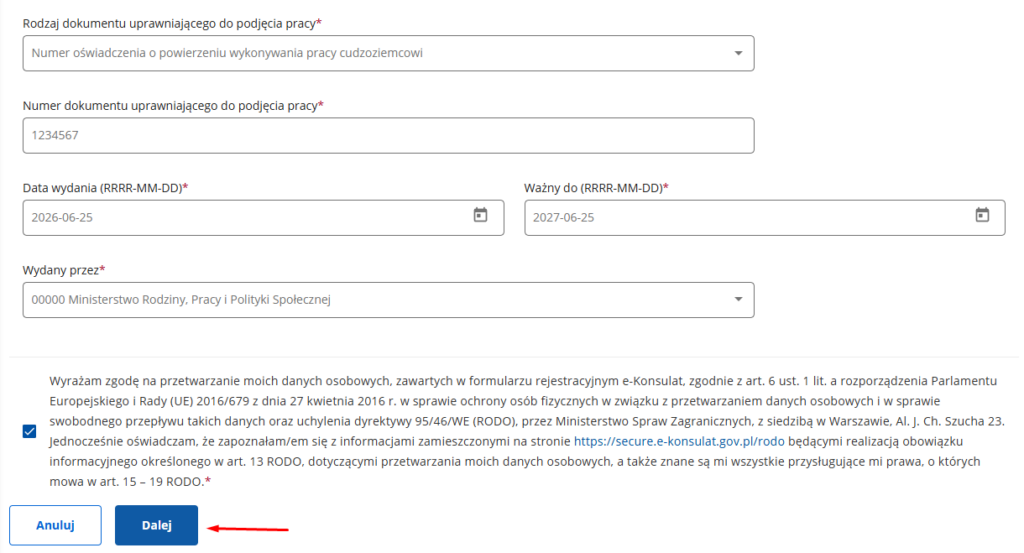
After submitting the request, you will receive an email with a confirmation link.
The link must be opened within 24 hours. After confirmation, the consulate reviews the request. If approved, you will receive another link to complete the registration. This may take around 48 hours.
2️⃣ Step 2: Filling Out the Visa Form
After receiving the link, the applicant completes the full visa application form. The form is divided into numbered sections.
Fields 1, 2, 3, 5, 11, 13, 16, 31, 34 on the form must be filled in using only letters of the Latin alphabet.
1. Personal Data
- Surname from passport;
- Previous surname, if any;
- First name;
- Date of birth (YYYY-MM-DD);
- Place of birth;
- Country of birth;
- Current citizenship;
- Citizenship at birth;
- Sex;
- Marital status;
- Identification number. (ИНН, Vergi Numarası, PAN, etc.)
All passport data must match the passport exactly.
2. Passport Details
- Type of travel document;
- Passport series and number;
- Issue date;
- Expiry date;
- Issuing authority.
For a standard foreign passport, choose the ordinary passport option.
3. Minors
This section is completed only if the applicant is under 18.
If the applicant is an adult, select not applicable.
4. Contact Details
Enter the current residential address, phone number, and email.
The email must be correct. After submission, it may be impossible to change.
If you lives in a country different from your citizenship, you must provide details of the residence permit or another legal stay document.
5. Professional Information
Choose yours current occupation.
For a Work Visa, enter employer details.
For Study Visas, enter the educational institution details. (Name and address)
For some visa types, such as a visa based on Karta Polaka, this section may not be required.
6. Travel Information
Choose the purpose of travel.
For a Work Visa, mark the purpose as Other, and write the explanation as PRACA.
For a Study Visa, mark the purpose as Nauka
For a Spouse with Karta Polaka Visa, mark the purpose as Other, and write the explanation as Karta Polaka żony/męża (Pole’s Card wife/husband)
Then enter:
- Destination country — Poland;
- Country of first entry;
- Number of entries: single, double, or multiple; (Multiple for National D Visa)
- Planned length of stay; (365 Days for National D Visa)
- Information about previous visas; (If you did not has a visa, click first checkbox “nie”)
- Information about fingerprints, if previously submitted;
- Planned date of entry; (At least 2 weeks after submitting your visa application)
- Planned date of departure.
7. Host or Inviting Party
For a Work Visa, enter the employer’s details.
For other visa types, this may be:
- hotel;
- inviting person;
- university;
- organization;
- family member.
The information must match the supporting documents.
8. Travel Expenses and Insurance
Choose who covers the cost of travel and stay:
- the applicant;
- employer;
- sponsor;
- inviting person.
Then mark the financial means, for example cash, bank card, accommodation, transport, or insurance.
If medical insurance is required, enter the validity period.
9. EU Citizen Family Member
If the applicant travels to a family member who is an EU, EEA, or Swiss citizen, special fields are completed for that person.
If this does not apply, mark the section as not applicable.
10. Final Declarations
At the end, the applicant confirms that:
- the visa fee is not refunded if the visa is refused;
- medical insurance information is understood, if applicable;
- all provided information is true and complete.
After clicking “Next,” the system allows the applicant to check the data again. If everything is correct, the form is saved.
✅ After Completing the Form
After saving, download and print the form.
If the application was registered for a consular appointment, the form receives an identifier and a barcode. This barcode page must not be lost because it is part of the visa application.